


People ask how many days of footage they get. The answer is not a 16 TB drive. It is camera count, 4K vs 2K, a busy or a quiet property, and whether a dead disk is allowed to take the recordings with it.
We put a storage calculator on the site for that. Pick your cameras, how many days to keep, and whether the property is mostly busy or mostly quiet. We pick the recorder and drives, with drive backup built in, and show the UniFi store price. It is a planning estimate. The written proposal after a site visit is the number that matters.
What it actually sizes
Four camera types: Doorbell, 2K camera, 4K camera, and Wide (180 or 360). Instant cameras count by their resolution. Pro cameras and the G6 PTZ count as 4K. Wide cameras count as 4K too, and the tool marks them as an estimate. Their sensors are bigger, so real use may run higher.
The rates are Ubiquiti’s, from their capacity calculator. 72.12 GB a day for a 2K camera or a doorbell. 109.92 GB a day for a 4K or Wide camera. That is recording all day. No padding on top. Days are rounded down instead.
Keep footage 7, 14, 30, 60 or 90 days. Mostly busy records all day. Mostly quiet records only when something moves, about 35% of all day recording. That 35% is our estimate, not a Ubiquiti figure. Enhanced Encoding shows as a second line: about 30% less space, so about 40% more days (34 becomes about 49). Also our estimate.
Then the real question: a drive just died. Then what. You do not pick RAID. The tool does it for you. One drive has no backup. Two drives are mirrored. Three or more keep one drive’s worth of space as protection, so one drive can fail without losing video. The Enterprise NVR keeps two drives’ worth once it has 9 or more drives. All drives are one size, up to 24 TB.
The recorder and the drives
Up to 6 cameras can use the UNVR Instant with one drive when one drive holds the days. Otherwise it picks the cheapest UNVR G2, G2 Pro or ENVR setup that fits your cameras and days, with drive backup.
Camera limits are Ubiquiti’s, and mixed cameras count by share. On the UNVR G2 each 2K camera uses 1/50 of the limit and each 4K camera uses 1/30. The G2 takes fewer cameras when its screen output (Viewport) is in use.
Drives are UniFi Enterprise 8 TB, 16 TB and 24 TB (UACC-HDD-E-*), plus the 4 TB Basic drive for the small boxes.
The UNVR Instant and the Dream Machine Pro have one drive bay. No backup. The footage dies with the disk, and the tool says so.
Already have a recorder? Use yours. Pick it from the list: UNVR Instant, UNVR G2, G2 Pro, ENVR, the older UNVR or UNVR Pro, Dream Machine Pro, or Dream Machine Pro Max. The tool sizes the drives for it, warns you if it is over its camera limit, and prices the drives only. Your recorder is not in the number.
Recorder availability at Ubiquiti changes, so we confirm the exact model when we write the estimate.
Two examples
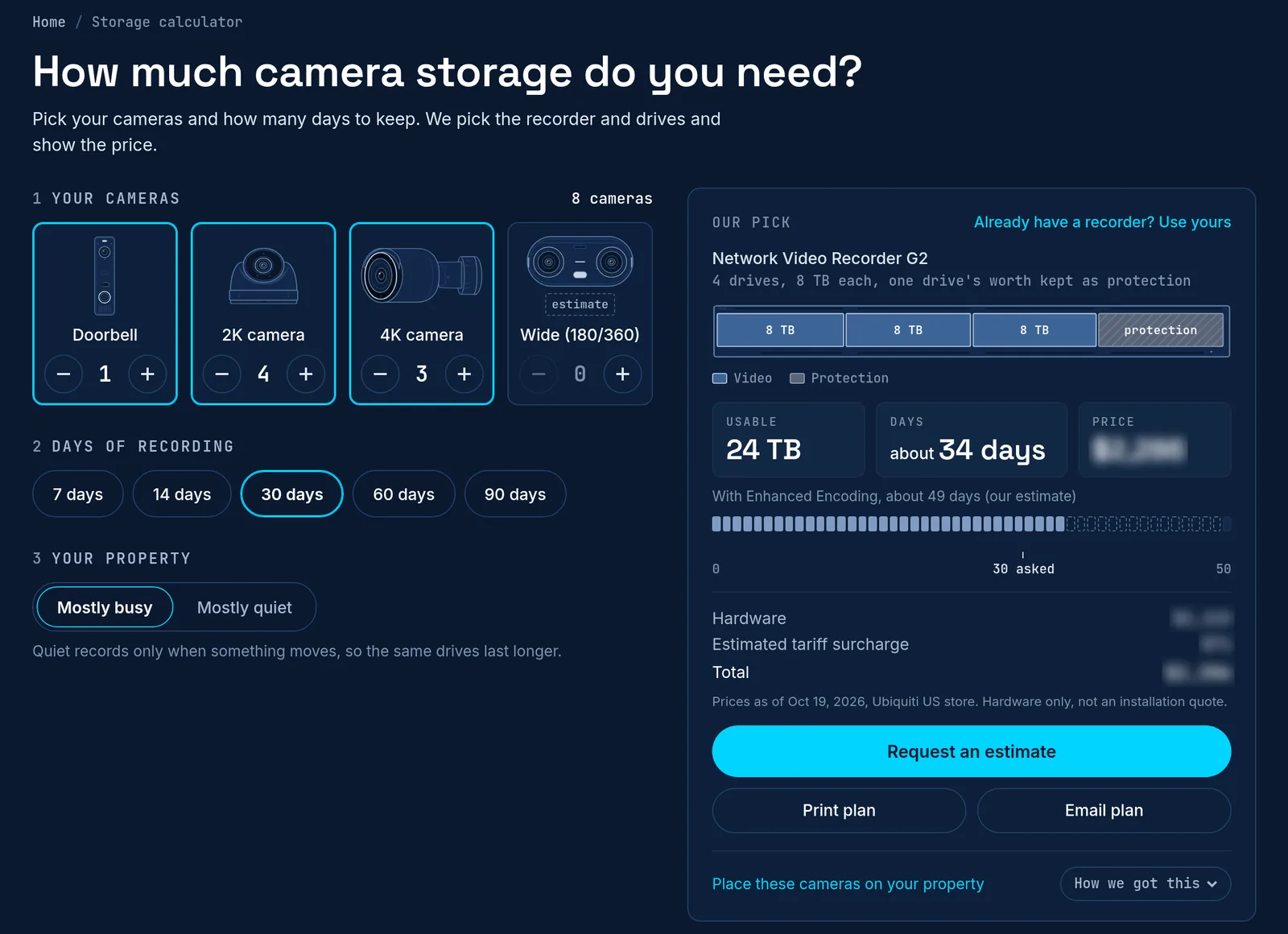
The page opens on a typical house: 1 doorbell, 4 x 2K, 3 x 4K, 30 days, mostly busy. That gives a UNVR G2 with 4 x 8 TB drives, 24 TB usable, about 34 days. The calculator shows the hardware total for that stack, with any estimated tariff surcharge on its own line.
Four 4K cameras at 30 days is a small site, so it gets the UNVR Instant with one 16 TB drive. About 36 days, no drive backup. Cheaper, but one dead disk takes the footage with it. Change the cameras and the stack changes with them.

Hardware totals in the calculator use the Ubiquiti US store list and show the date they were checked. UniFi surcharges may apply, and they move.
Not sure how many cameras the property needs? Sketch it in Sight first. You place cameras on a satellite view of the lot and get a coverage ballpark, then bring that camera count back here.
What that is not
It is not a quote, a contract, or a promise that footage will exist for N days. Real numbers settle after about a week of recording. Drive backup covers one dead disk. It is not a copy of your video. A dead NVR, a power event, theft, or fire can still lose recordings. Drives currently show no extra surcharge. The recorder does. We confirm on site.
Cloud camera seats are a different product. This tool is for on-prem Protect. The NVR is in the rack. Footage stays here.


